
Duplicate an order limit rule
Want to create a new rule based on one you’ve already configured? The Samita Order Limit app makes it easy to duplicate any existing rule. This saves time and ensures consistency when creating similar rules with minor changes.
Follow the steps below to duplicate a rule.
🔁 How to Duplicate a Rule
Section titled “🔁 How to Duplicate a Rule”-
From your Shopify admin, open the Samita Order Limit app.
-
In the Rule screen, tick on the rule you want to duplicate.
-
In the top-right corner, click the Duplicate select rule(s) button.
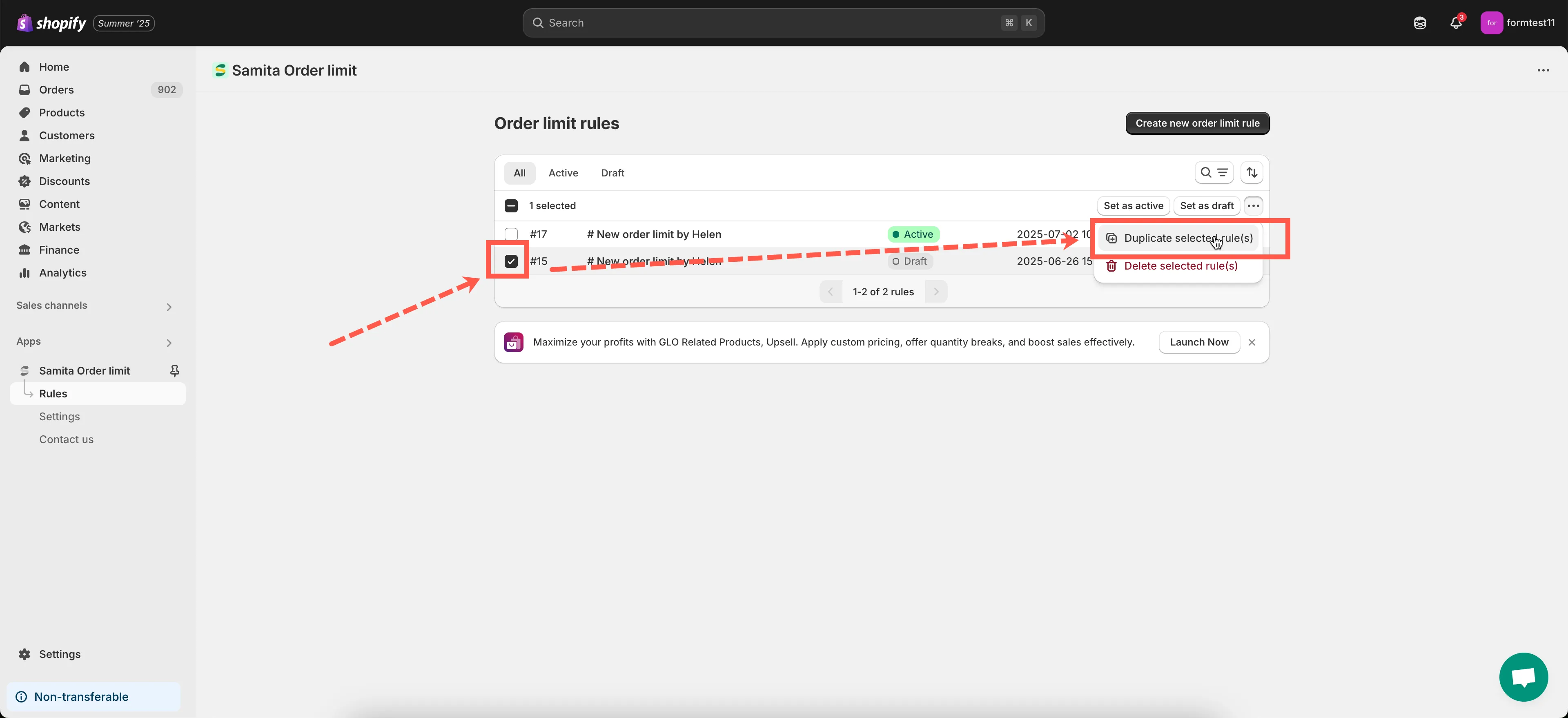
-
A copy of the rule will be created and located at the top of the order limit rule list.
-
You can now edit the duplicated rule:
- Change the rule name
- Adjust products, customers, scope, or limit values
- Save the changes when you’re ready
🎉 That’s it! You’ve successfully created a new rule based on an existing one.
📝 Why Duplicate a Rule?
Section titled “📝 Why Duplicate a Rule?”- Quickly apply similar limits to different products or customer groups
- Create separate rules for wholesale vs. retail customers
Need help with configuring your duplicated rule? Reach out to us at support@samita.io - we’re happy to help!