
Disable an order limit rule
In the Samita Order Limit app, you can temporarily disable a rule without deleting it. This is useful when you want to stop enforcing a specific rule but keep it saved for future use.
Follow the steps below to disable any existing rule in your dashboard.
🔧 How to Disable a Rule
Section titled “🔧 How to Disable a Rule”- From your Shopify admin, open the Samita Order Limit app.
- In the Rule screen, tick on the rule you want to disable.
- In the top-right corner, click the Set as Draft button.
- The rule status will change to “Draft” status.
- The rule will no longer be applied on your storefront
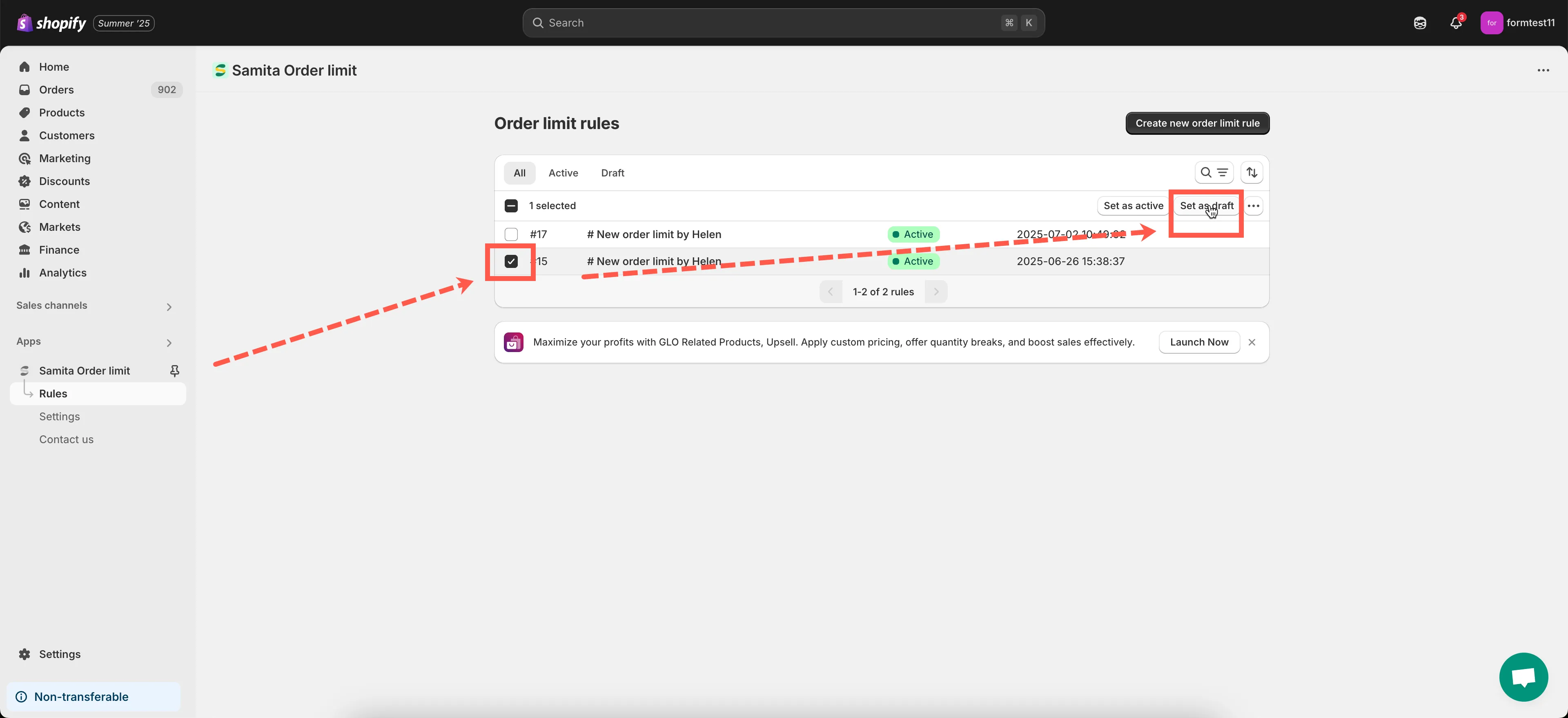
🎉 Done! The rule is now disabled but still saved in your account.
✅ Notes
Section titled “✅ Notes”- Disabling a rule does not delete it. You can re-enable it anytime.
- Disabled rules will not affect your storefront or block checkout.
- You can manage multiple rules and keep different configurations saved for future use.
Need help managing your rules? Contact us at support@samita.io - we’re happy to assist!