
Theme Integration
Uninstall app from theme
If you no longer wish to use the Samita Order Limit app on your storefront, you can remove its functionality by disabling the app embed in your Shopify theme.
This action will stop the app from applying order limit rules to your online store.
🔧 Step-by-Step Instructions
Section titled “🔧 Step-by-Step Instructions”- From your Shopify admin, go to Online Store > Themes
- Find your active theme and click Customize
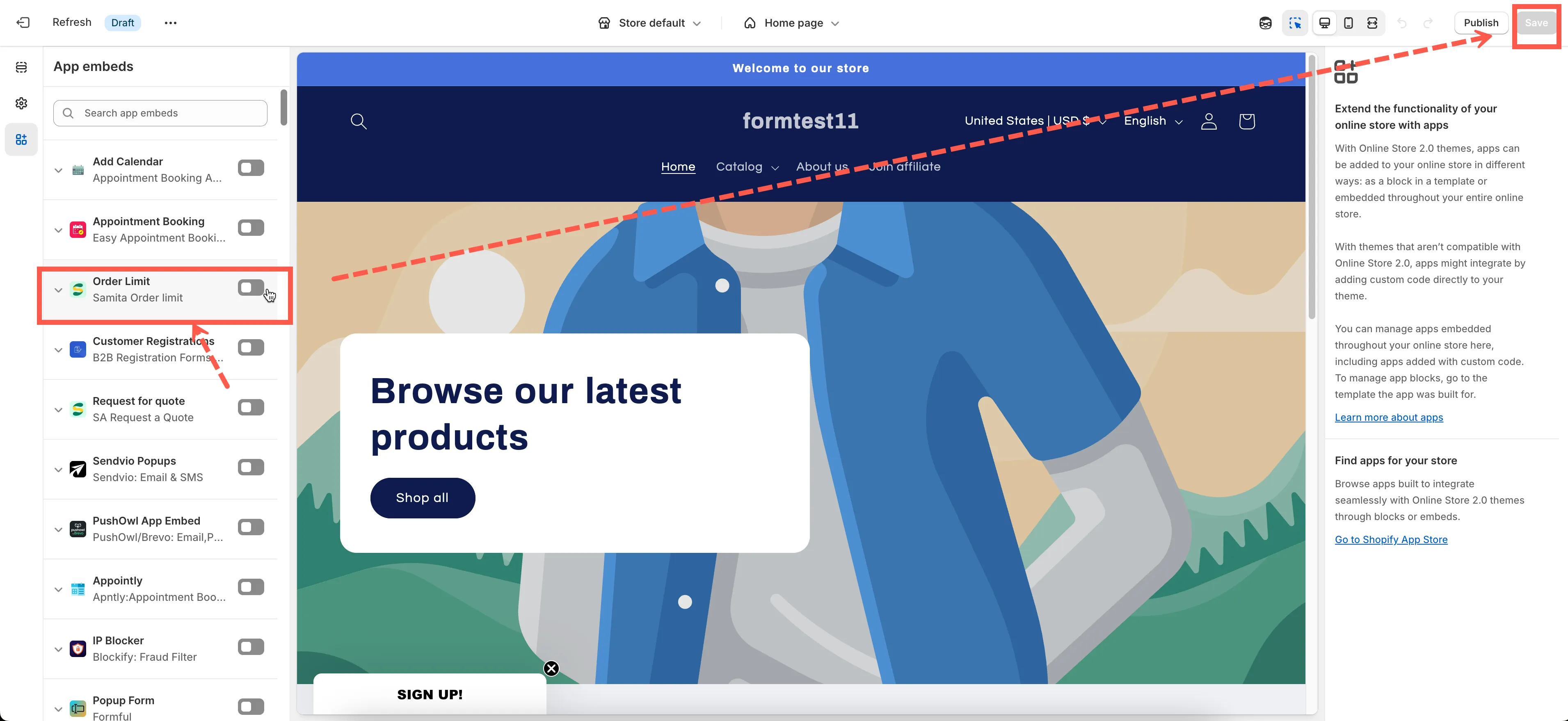
- In the Theme Editor, look at the left-hand menu and click the App embeds icon
- Find the toggle for Samita Order Limit
- Switch it OFF
- Click Save at the top-right corner of the editor
That’s it! The app is now disabled on your storefront.
📝 Note:
Section titled “📝 Note:”Disabling the app embed removes its functionality from your theme but keeps your rules and settings saved in the app. You can re-enable it anytime by toggling the app embed back on.
If you plan to fully uninstall the app from Shopify, don’t forget to also:
- Delete the app from your Apps list in the Shopify admin
If you need assistance with removal or cleanup, feel free to contact us at support@samita.io.