
How to add Sami Wholesale to POS
Easily apply your wholesale pricing at your physical store
With Samita Wholesale Pricing, you can offer your wholesale discounts not just on your online store, but directly at your physical store through Shopify POS.
How it works
Section titled “How it works”Once you connect Samita Wholesale Pricing to Shopify POS, your wholesale customers get their special pricing when buying in person:
- Wholesale prices sync automatically to POS.
- Approved wholesale customers check out at their discounted rate right at the counter.
- Orders placed via POS are tracked the same way as online wholesale orders.
Add Sami Wholesale to POS
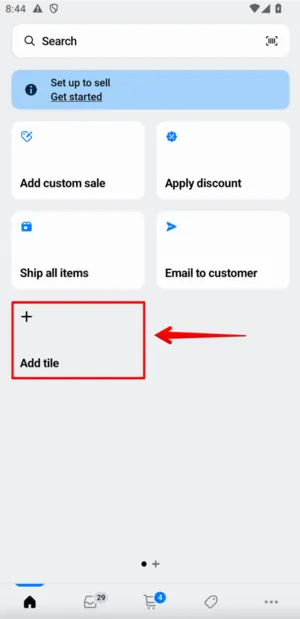
Section titled “Add Sami Wholesale to POS”In the Smart grid section, click Add tile.
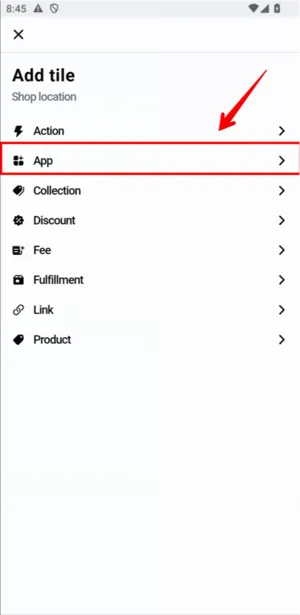
In the App tile section, choose App, then select Sami Wholesale from the list of POS apps you’ve already added in Shopify admin.
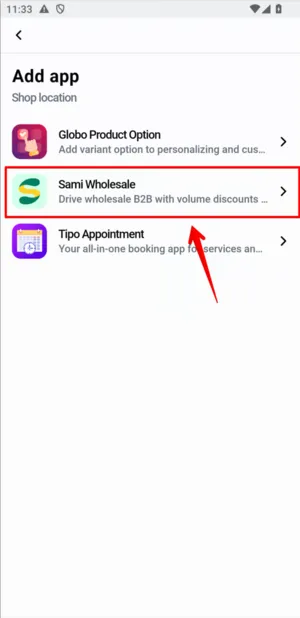
That’s it — you can now create orders in POS with the app’s discounts applied. See Create a wholesale order on POS.