
Choose pricing source: Selling price or Compare-at price
Choose whether a wholesale pricing rule discounts Shopify's Selling price or its Compare-at price.
Every wholesale pricing rule has a Pricing source setting that controls which Shopify price the discount is calculated from.
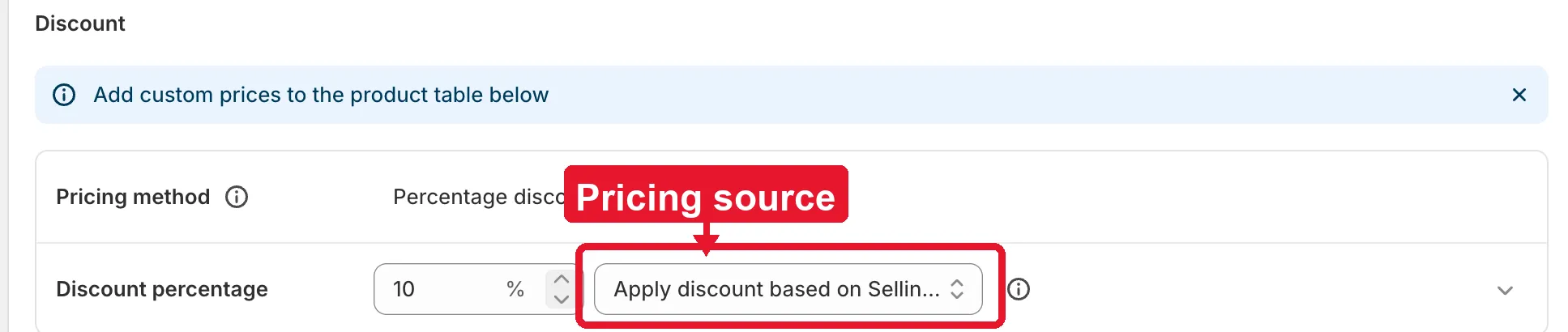
You’ll find it in the rule’s Discount section, right next to the discount value field. It’s only available for the Percentage discount and Fixed amount discount pricing methods — it’s hidden when you choose Fixed wholesale price, since that method sets an absolute price and doesn’t need a source price to discount from. See Select Discount Type for how the three pricing methods differ.
Options
Section titled “Options”- Apply discount based on Selling price (default) — the discount is calculated from the product’s current Shopify Price.
- Apply discount based on Compare at price — the discount is calculated from the product’s Shopify Compare-at price instead.
Example: a product’s Selling price is $80 and its Compare-at price is $100. With a 20% discount rule, choosing Selling price gives a wholesale price of $64 ($80 − 20%), while choosing Compare-at price gives $80 ($100 − 20%).
Need support?
Section titled “Need support?”If you do encounter any difficulty while proceeding these steps, don’t show any hesitation to contact us promptly via the email address support@samita.io.