
Cart countdown
When the cart timer expires
The three things a cart countdown can do when it reaches zero, and how to choose between them.
A cart countdown is the only type whose ending can change the shopper’s cart. The Action after time expired setting, on the Display tab, decides what happens.
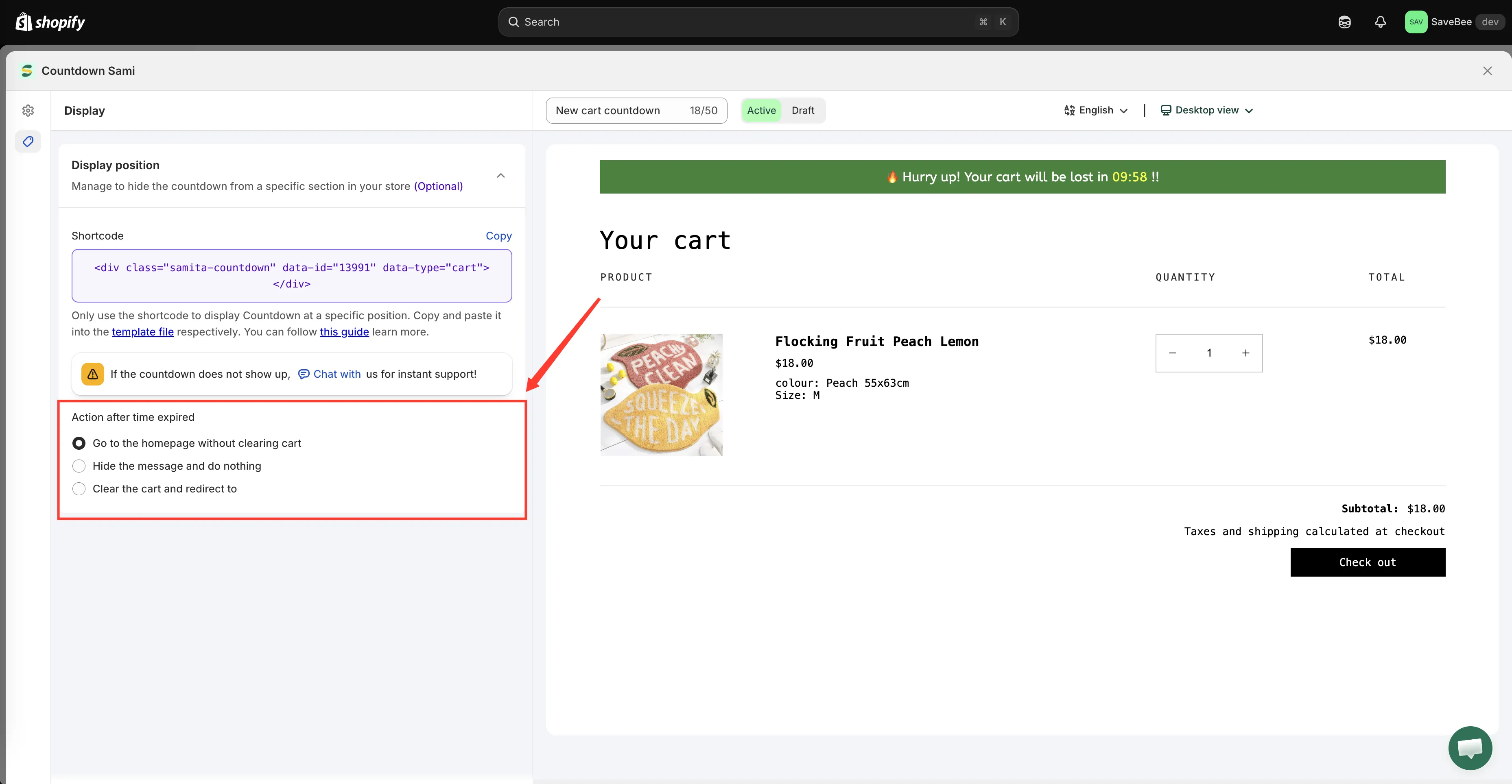
Action after time expired, on the Display tab of a cart countdown.
The three options
Section titled “The three options”| Option | What happens at zero |
|---|---|
| Go to the homepage without clearing cart | The shopper is sent to your home page. Their cart is untouched |
| Hide the message and do nothing | The countdown disappears. Nothing else changes |
| Clear the cart and redirect to | The cart is emptied and the shopper is sent to a URL you choose |
Go to the homepage without clearing cart
Section titled “Go to the homepage without clearing cart”The default. When the timer runs out, the shopper is moved to your home page, but everything they added is still in the cart.
It interrupts without costing them anything, which is the balance most stores want. The interruption is still real, though — a shopper who stepped away mid-checkout comes back to a different page than the one they left.
Hide the message and do nothing
Section titled “Hide the message and do nothing”The timer disappears and the shopper carries on exactly where they were.
This is the gentlest option and the one to pick if you’re unsure. The countdown does its job while it’s running — a visible clock next to the checkout button — and simply stops when it’s done, with no page change and nothing lost.
Clear the cart and redirect to
Section titled “Clear the cart and redirect to”The cart is emptied and the shopper is sent to the URL you enter. Leave the URL field empty and they stay on the page they’re on, with an empty cart.
Use it only when the empty cart reflects something real — a genuine reservation system where holding stock any longer would be wrong — and make sure your message says so plainly before it happens.
Choosing
Section titled “Choosing”| Your goal | Use |
|---|---|
| Nudge shoppers without risk | Hide the message and do nothing |
| Interrupt, but keep the cart safe | Go to the homepage without clearing cart |
| Genuinely release a reservation | Clear the cart and redirect to |
Match your message to the action
Section titled “Match your message to the action”The message and the action are set in different tabs, which makes them easy to leave out of step. The default message says “Your cart will be lost” — true only with the clearing action, and a broken promise with either of the others.
| Action | A message that matches |
|---|---|
| Hide the message and do nothing | Complete your order within {timer} |
| Go to the homepage without clearing cart | Finishing up? You have {timer} left |
| Clear the cart and redirect to | 🔥 Hurry up! Your cart will be lost in {timer} !! |
Test it before you rely on it
Section titled “Test it before you rely on it”Set the duration to a minute or two in a draft, add something to your cart in a private browser window, and watch the timer run out. Whichever action you chose, you should see exactly what a shopper would.
Put the real duration back before saving it as Active.