
Estimated delivery date
Date range settings
Set dispatch and delivery day ranges, working days, holidays, and date formats.
The Date range setting section on the Settings tab is where the delivery window actually comes from. Everything a shopper sees as a date is calculated from these fields.
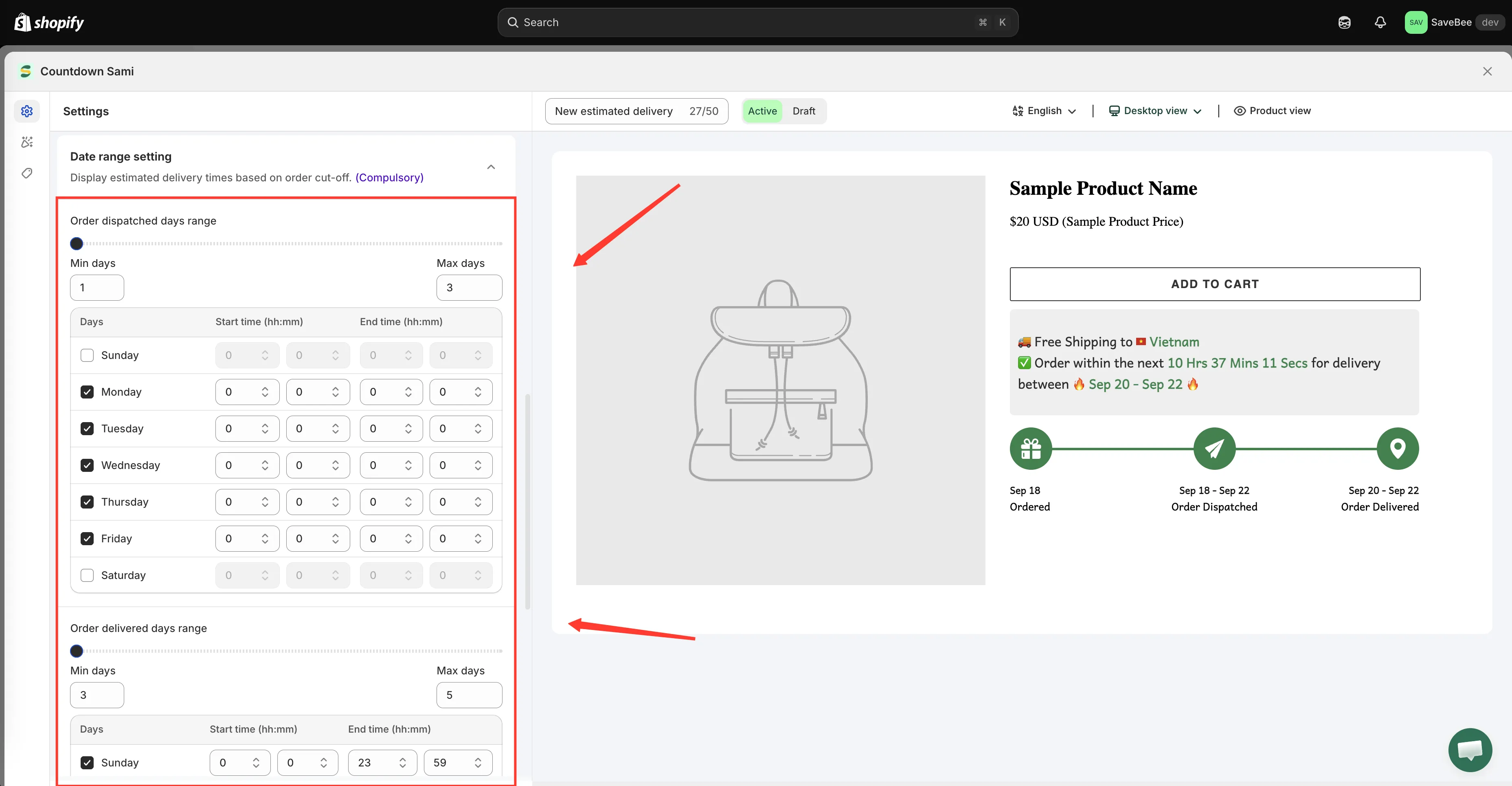
Dispatch and delivery are configured separately, each with its own working days.
Two stages, configured separately
Section titled “Two stages, configured separately”The window is built in two steps, and each has its own settings.
Order dispatched days range
Section titled “Order dispatched days range”How long it takes you to get the order out of the door.
| Field | Meaning | Default |
|---|---|---|
| Min days | Fastest you’d dispatch | 1 |
| Max days | Slowest you’d dispatch | 3 |
| Days | The weekdays you dispatch on | Monday–Friday |
These feed the {dispatched_min_date} and {dispatched_max_date} variables.
Order delivered days range
Section titled “Order delivered days range”How long the carrier takes after dispatch.
| Field | Meaning | Default |
|---|---|---|
| Min days | Fastest delivery | 3 |
| Max days | Slowest delivery | 5 |
| Days | The weekdays deliveries arrive on | Every day |
These feed {delivered_min_date} and {delivered_max_date}.
Working days matter more than you’d think
Section titled “Working days matter more than you’d think”The Days checkboxes aren’t decoration — days you don’t tick are skipped entirely when counting.
Leave dispatch on Monday–Friday and an order placed on Saturday starts counting from Monday. Untick Sunday for delivery and a window that would have landed on Sunday moves to Monday instead.
Set these to match reality:
- Dispatch days — the days someone is actually in your warehouse packing orders.
- Delivery days — the days your carrier actually delivers in your main market.
Holidays
Section titled “Holidays”The Holiday field takes a list of dates to exclude from the calculation entirely, described in the app as “These dates will be excluded from the estimation.”
Add your public holidays and any days you’re closed. A store that adds its December closure in November stops promising deliveries that can’t happen.
Date & time settings
Section titled “Date & time settings”Two formatting controls decide how the calculated values are written out.
Date format
Section titled “Date format”Two dozen formats, from short to fully spelled out:
MM/DD/YY · MM/DD/YYYY · DD/MM/YY · DD/MM/YYYY · YY/MM/DD · DD.MM.YY · YY.MM.DD · YYYY-MM-DD · DD MMM, YYYY · DD MMMM, YYYY · MMMM DD · MMM DD · DD MMMM · dddd · dd · and several long forms such as dddd, MMMM DD, YYYY
The default is MMM DD — “Mar 14”.
Time format
Section titled “Time format”How the {cutoff_time} countdown is written:
Hrs, Mins, Secs · Hrs, Mins · Hours, minutes, seconds · Hours, minutes · hours, minutes, seconds · H, M, S
Short forms suit a compact product page; long forms suit a wide banner.
Checking your setup
Section titled “Checking your setup”The builder preview updates as you change these fields, so you can see the effect immediately. Two things are worth checking deliberately:
- Set a dispatch day range with a weekend in the middle and confirm the dates skip it.
- Add today as a holiday temporarily and confirm the window moves. Remove it afterwards.