
Estimated delivery date
Cut-off time
Set the daily deadline that decides whether an order counts today or tomorrow — including a different one per weekday.
The cut-off time is the daily deadline for an order to be treated as today’s. Order before it and the delivery window starts counting from today; order after it and the count starts tomorrow.
It’s also the thing the {cutoff_time} variable counts down to, which is what turns a flat delivery estimate into something urgent: “Order within the next 4h 12m for delivery between Mar 14 – Mar 16”.
Where to find it
Section titled “Where to find it”Open a delivery date countdown, go to the Settings tab, and open the Date range setting section. The cut-off controls sit with the dispatch and delivery day ranges.
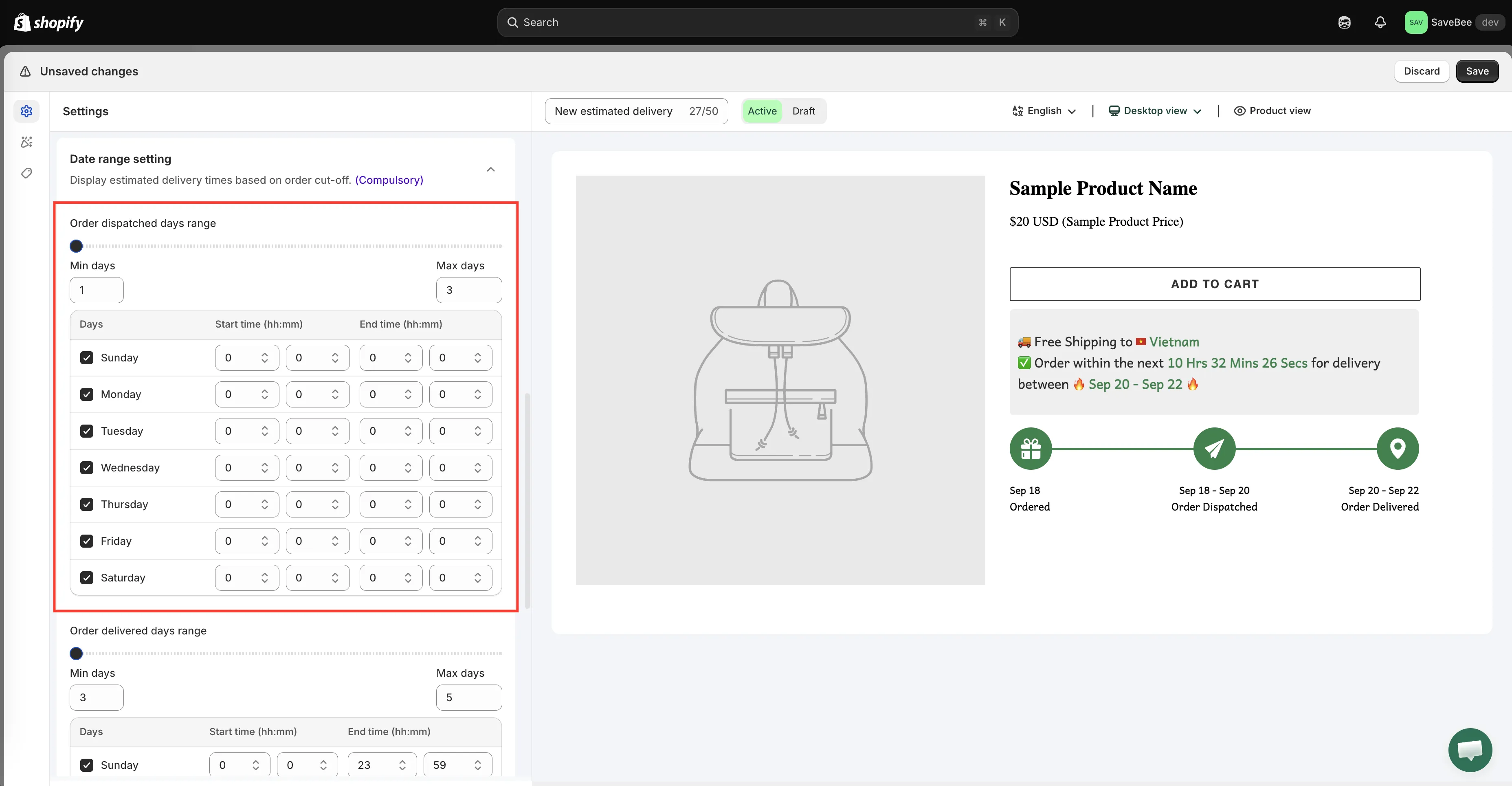
The cut-off sits alongside the dispatch and delivery ranges.
The default: 23:59
Section titled “The default: 23:59”A new delivery date uses 23:59 — effectively “any time today still counts as today”.
That’s a safe starting point, but it makes the {cutoff_time} countdown much less persuasive: at 10 in the morning it reads about fourteen hours, which is no kind of deadline. If you use the cut-off variable in your message, set a real time.
Setting one cut-off for every day
Section titled “Setting one cut-off for every day”Enter the hours and minutes of your daily deadline. If you pack and hand over to your carrier at 2pm, set 14:00.
Shoppers arriving before 14:00 see today counted as day zero; shoppers arriving at 14:01 see the window shifted a day later, with the countdown now pointing at tomorrow’s deadline.
Setting a different cut-off per weekday
Section titled “Setting a different cut-off per weekday”Most stores don’t run the same hours seven days a week. The cut-off can be set per day, with a row for each of Sunday through Saturday.
Each row gives you:
- An All day option, for days with no meaningful deadline.
- A Start time (hh:mm) and End time (hh:mm), for days with a real one.
Dispatch and delivery keep their own per-day cut-offs, so you can say “we pack until 3pm on weekdays, noon on Saturday, and not at all on Sunday” and have the calculation reflect it.
A worked example
Section titled “A worked example”Your store dispatches Monday to Friday, cut-off 14:00. Dispatch takes 1–3 days, delivery 3–5 days, and deliveries don’t happen on Sunday.
| Shopper arrives | Counting starts | What they see |
|---|---|---|
| Tuesday 09:00 | Tuesday | A countdown of about 5 hours to the cut-off |
| Tuesday 15:00 | Wednesday | A countdown of about 23 hours, window one day later |
| Saturday 11:00 | Monday | The next working day, since Saturday isn’t a dispatch day |
Checking it
Section titled “Checking it”The most useful test is the one either side of your own deadline: load a product page shortly before your cut-off, note the window, then load it again afterwards. The dates should move on by a day and the countdown should reset to the next deadline.