
Enable the Collection condition
Add one template file to your theme so the Collection condition can match products.
The Collections condition needs one small template file in your theme. Without it, the app can’t tell which collections a product belongs to on the storefront, so a countdown targeted at a collection won’t appear.
You only do this once per theme, and the app tells you when it’s needed: a warning banner appears in the countdown builder, with a Request setup button if you’d rather support did it for you.
Steps to add the file
Section titled “Steps to add the file”-
Open your theme’s code editor
Section titled “Open your theme’s code editor”In your Shopify admin, go to Online Store → Themes. On the theme you want, click the … (More actions) button and choose Edit code.
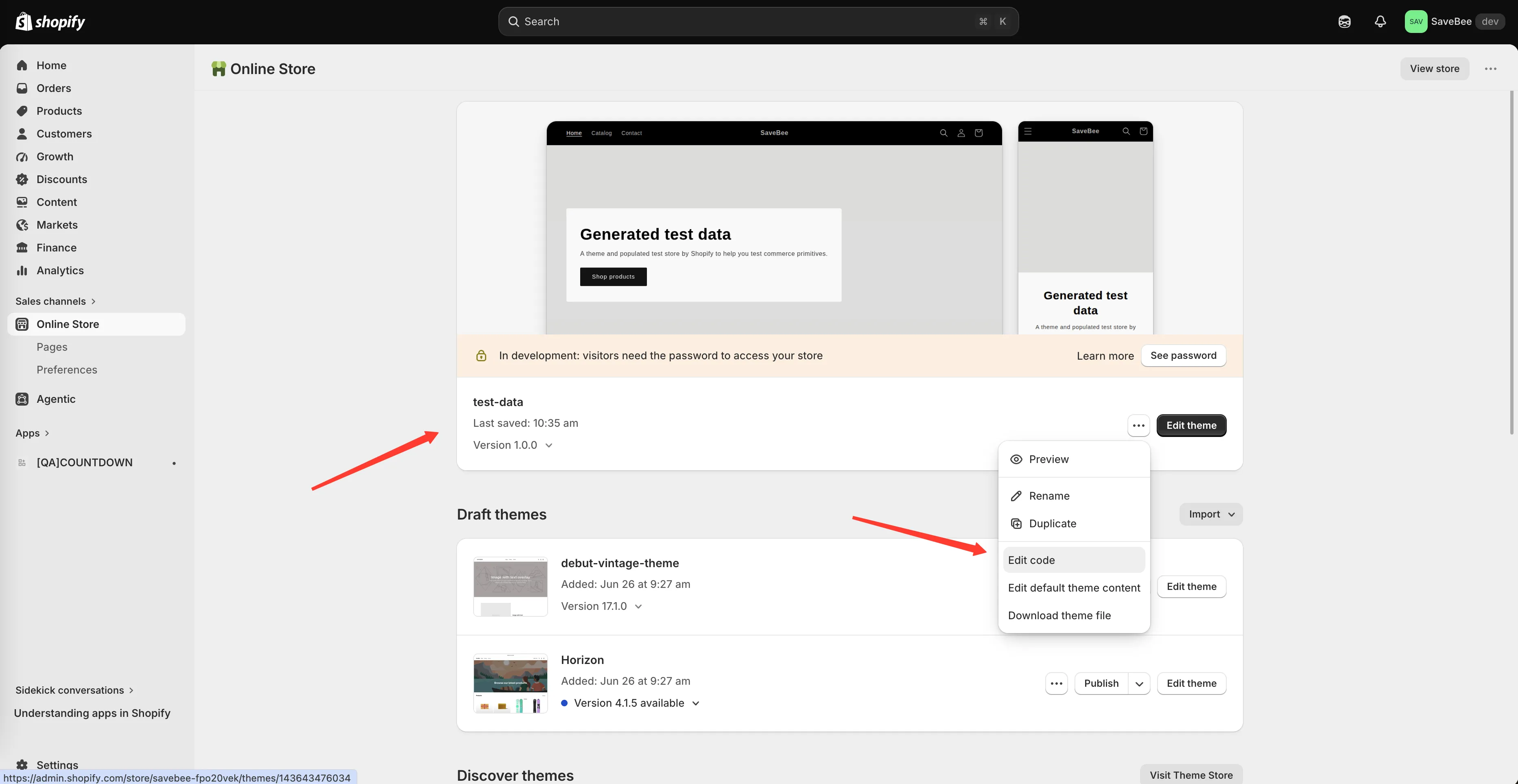
Open the theme’s code editor from More actions → Edit code.
-
Create a new template file
Section titled “Create a new template file”In the Templates folder, click Add a new template, choose a search template of type liquid, and name it:
samiCountdownsProductsJsonShopify saves this as
templates/search.samiCountdownsProductsJson.liquid.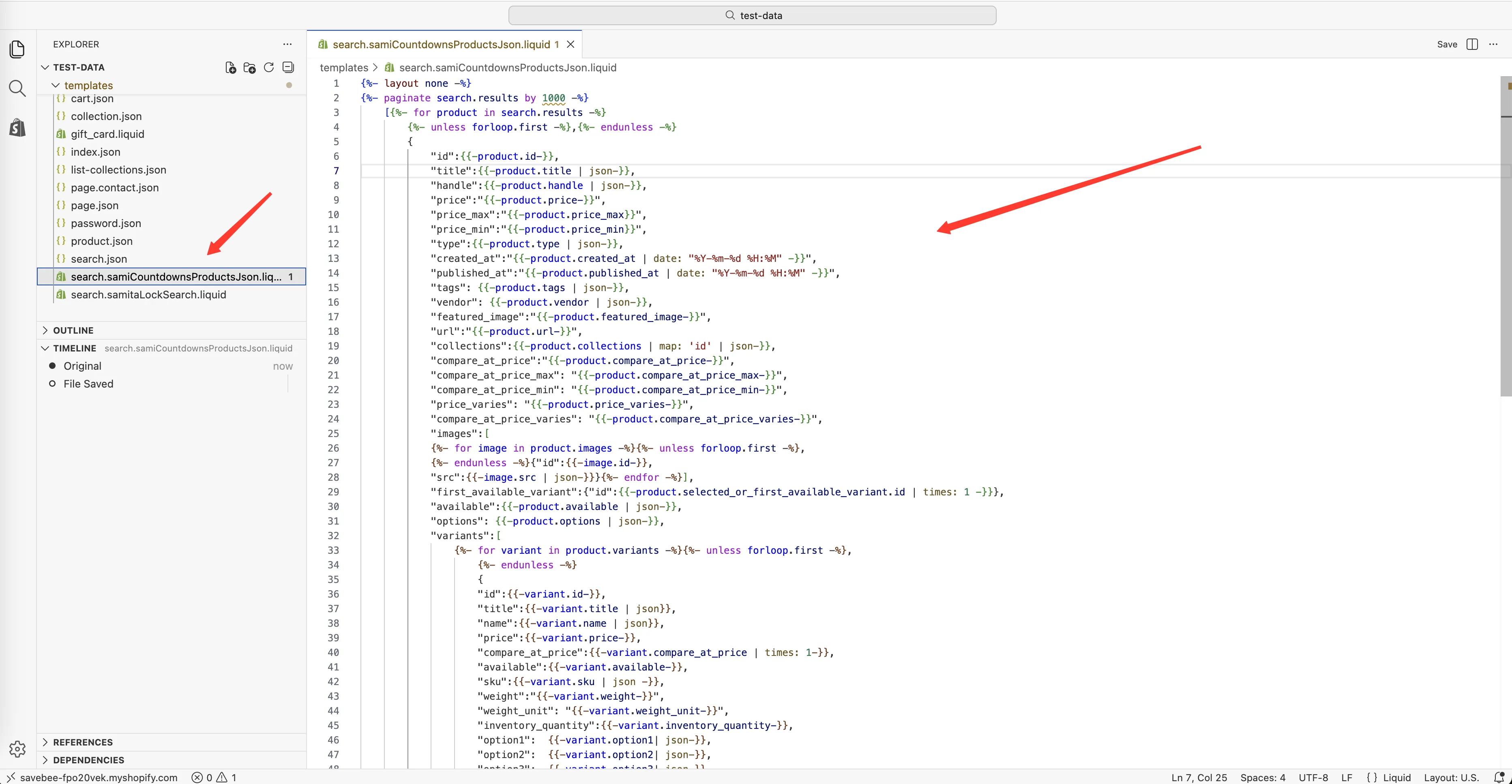
Create a search template named samiCountdownsProductsJson.
-
Replace its contents
Section titled “Replace its contents”Delete whatever Shopify put in the new file and paste this in its place:
{%- layout none -%}{%- paginate search.results by 1000 -%}[{%- for product in search.results -%}{%- unless forloop.first -%},{%- endunless -%}{"id":{{-product.id-}},"title":{{-product.title | json-}},"handle":{{-product.handle | json-}},"price":"{{-product.price-}}","price_max":"{{-product.price_max}}","price_min":"{{-product.price_min}}","type":{{-product.type | json-}},"created_at":"{{-product.created_at | date: "%Y-%m-%d %H:%M" -}}","published_at":"{{-product.published_at | date: "%Y-%m-%d %H:%M" -}}","tags": {{-product.tags | json-}},"vendor": {{-product.vendor | json-}},"featured_image":"{{-product.featured_image-}}","url":"{{-product.url-}}","collections":{{-product.collections | map: 'id' | json-}},"compare_at_price":"{{-product.compare_at_price-}}","compare_at_price_max": "{{-product.compare_at_price_max-}}","compare_at_price_min": "{{-product.compare_at_price_min-}}","price_varies": "{{-product.price_varies-}}","compare_at_price_varies": "{{-product.compare_at_price_varies-}}","images":[{%- for image in product.images -%}{%- unless forloop.first -%},{%- endunless -%}{"id":{{-image.id-}},"src":{{-image.src | json-}}}{%- endfor -%}],"first_available_variant":{"id":{{-product.selected_or_first_available_variant.id | times: 1 -}}},"available":{{-product.available | json-}},"options": {{-product.options | json-}},"variants":[{%- for variant in product.variants -%}{%- unless forloop.first -%},{%- endunless -%}{"id":{{-variant.id-}},"title":{{-variant.title | json}},"name":{{-variant.name | json}},"price":{{-variant.price-}},"compare_at_price":{{-variant.compare_at_price | times: 1-}},"available":{{-variant.available-}},"sku":{{-variant.sku | json -}},"weight":"{{-variant.weight-}}","weight_unit": "{{-variant.weight_unit-}}","inventory_quantity":{{-variant.inventory_quantity-}},"option1": {{-variant.option1| json-}},"option2": {{-variant.option2| json-}},"option3": {{-variant.option3| json-}},"options": {{-variant.options| json-}},"selected": {%- if variant.selected -%} {{-variant.selected-}} {%- elsif product.selected_or_first_available_variant.id == variant.id -%} true {%- else -%} false {%- endif -%}}{%- endfor -%}]}{%- endfor -%}]{%- endpaginate -%} -
Save the file
Section titled “Save the file”Click Save in the code editor.
-
Go back to the app and open Theme integration
Section titled “Go back to the app and open Theme integration”Return to Countdown Timer Bar Samita and open the Theme integration page, so the app picks up the change on this theme.
-
Test a collection condition
Section titled “Test a collection condition”Open a countdown, set its condition to Collections and pick one, save it as Active, then visit a product in that collection on your live storefront. The countdown should appear.
Check a product outside the collection too — it should show nothing.
What the file actually does
Section titled “What the file actually does”It’s a search template that returns product information as data rather than as a web page — including each product’s collections, which isn’t otherwise available to the app on the storefront. The app requests it in the background when it needs to check a collection condition; shoppers never see it.
Things worth knowing
Section titled “Things worth knowing”- It’s per theme. Change theme, or install a new one, and you add the file there too.
- The name has to be exact.
samiCountdownsProductsJson, capitals included. A typo means the file is never found, with no error on the page. - It reads, it doesn’t write. The file doesn’t alter your theme’s behaviour or appearance.